Control LLM spend
before it hits your bill
An in-VPC proxy for teams spending $10K+/mo on OpenAI, Anthropic, and Google. Attributes every API call to the right feature, calculates true cost including cached and reasoning tokens, and enforces spend controls before the invoice arrives.
Docker container. One environment variable. No SDK. No code changes.
How it works
An in-VPC proxy between your code and LLM providers
SpendProxy intercepts every API call, calculates true cost from the provider response, attributes it to a feature, and stores everything locally. Your data never leaves your infrastructure.
SpendProxy is not
- × An observability platform. We don't do traces or evals
- × A hosted SaaS gateway. Your data never leaves your VPC
- × A multi-provider routing layer. Use LiteLLM for that
SpendProxy is
- ✓ A cost-control proxy that enforces spend policy before the bill
- ✓ An accuracy layer that calculates true cost including cached and reasoning tokens
- ✓ An attribution engine that maps every dollar to a feature, automatically
The problem
Your LLM cost dashboard is lying to you
Every AI cost tool gets the numbers wrong. Cached tokens, reasoning tokens, and provider-specific billing create 2-10x discrepancies.
| Tool | Bug | Impact |
|---|---|---|
| LiteLLM | Cached tokens charged at full rate | 10.9x overcharge |
| LiteLLM | Bedrock costs drastically undercounted | 29x undercount |
| Langfuse | Cache pricing ignored | 2.83x overcharge |
| Cloudflare AI Gateway | Spend completely missed | $15 vs $1,560 |
Cached tokens charged at full rate
Bedrock costs drastically undercounted
Cache pricing ignored
Spend completely missed
These aren't edge cases. Cached tokens are 50-90% of production traffic. If your tool gets caching wrong, every number on your dashboard is wrong.
111 tests verify every calculation
Cached token semantics, reasoning token billing, streaming token counting, and provider-specific edge cases. Every model, every provider, every billing scenario.
Accurate cost tracking
LLM costs you can trust
Every provider handles cached tokens differently. SpendProxy gets them all right.
prompt_tokens includes cached tokens. SpendProxy subtracts them before billing. Most tools don't.
input_tokens excludes cached tokens. They're billed separately at a different rate. This is where LiteLLM charges 10.9x too much.
promptTokenCount includes cached tokens. SpendProxy subtracts them. Reasoning tokens (Gemini 2.5) are separated and billed at the correct rate.
Autopilot optimization
5 engines that reduce your bill automatically
Each engine can run in off, monitor, or autopilot mode. Start observing, then flip the switch when you're ready.
Cache Injection
Response Deduplication
Model Routing
Budget Guardrails
Retry Storm Suppression
Automatic attribution
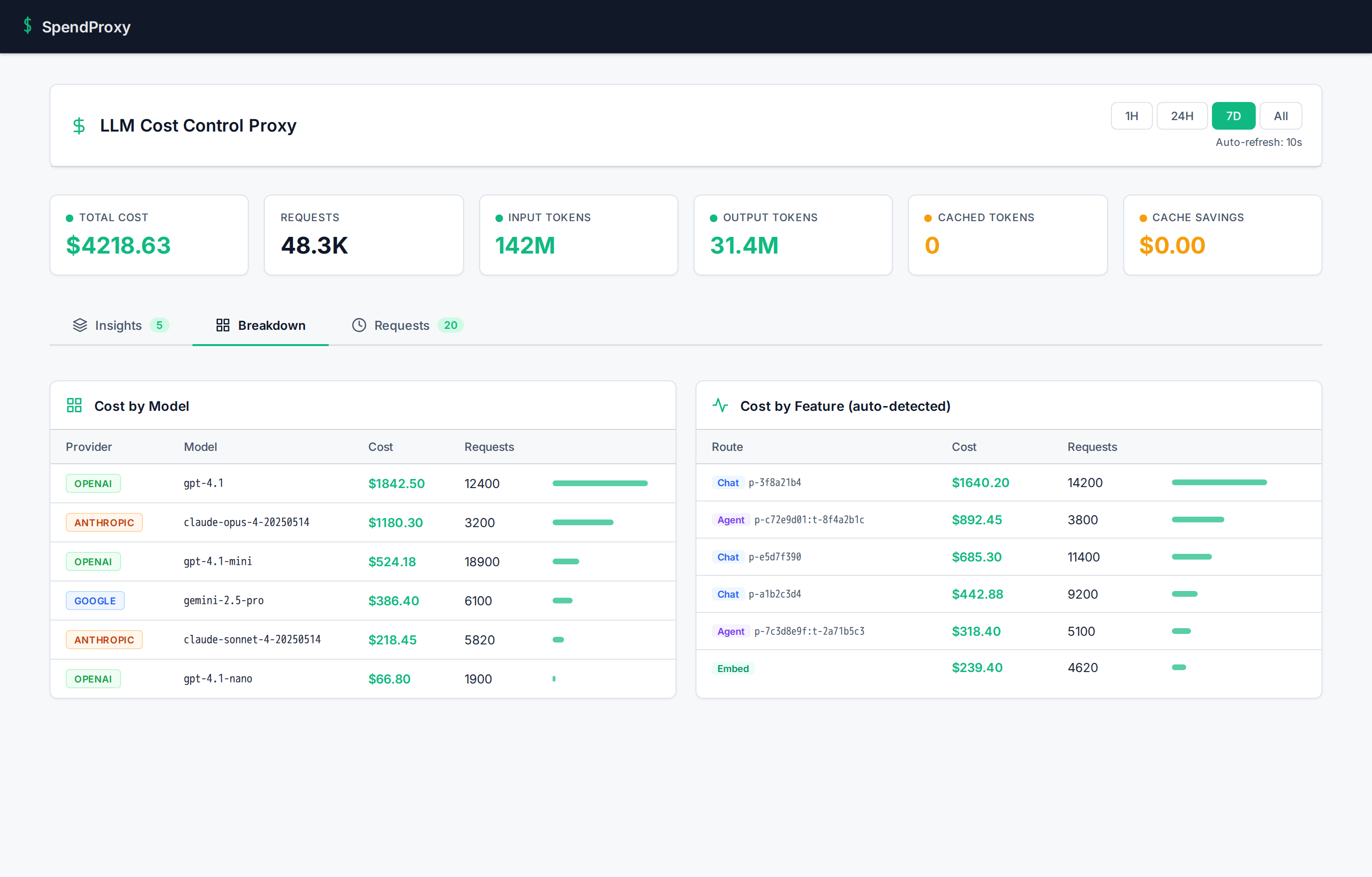
Know which features cost what, without tagging a single request
Every other tool requires manual tags, SDK decorators, or metadata headers. SpendProxy figures it out automatically.
How it works
- 01 System prompt fingerprinting: same prompt = same feature, always
- 02 Toolset fingerprinting: same function tools = same agent
- 03 Workload classification: chat, agent, embeddings, image gen, audio
- 04 SDK detection: openai-python, langchain, vercel-ai, crewai, and more
What you see in the dashboard
Zero code changes. Zero tags. Zero SDK.
Security
You're installing a Docker container in your VPC. Here's why that's safe.
We know what we're asking. Here's what SpendProxy does and doesn't do — verifiable, not just promised.
What SpendProxy does
- ✓ Forwards API requests to providers with your existing keys
- ✓ Reads token counts from provider responses to calculate cost
- ✓ Stores metadata (token counts, model, latency) in local SQLite
- ✓ Makes one outbound call every 12 hours for license validation
What SpendProxy does NOT do
- × Store, log, or read your API keys
- × Store prompt or response content
- × Send any data to us (beyond the license check)
- × Open any inbound ports or accept external connections
tcpdump or network policiesSetup
Deploy in 5 minutes. Save money by day one.
One Docker container. One environment variable. That's the entire integration.
Start SpendProxy
Pull the Docker image and run it. One command.
Point your AI SDK at it
Change one URL. Your API keys pass through untouched.
Watch costs drop
Open the dashboard. Cost data appears in real time.
 # 1. Start SpendProxy
docker run -d -p 4100:4100 spendproxy/proxy:latest

# 2. Point your existing code at SpendProxy
export OPENAI_BASE_URL=http://localhost:4100/v1

# That's it. No SDK. No code changes.
Pricing
$2,500 pilot. ROI in the first week.
Two-week hands-on pilot with VPC deployment, cost audit, and all 5 optimization engines. Then $1,500/mo ongoing.
The pilot
What happens when you start
Deploy & audit
We deploy SpendProxy in your VPC, point your traffic through it, and run a full cost audit. You see accurate numbers for the first time, broken down by model, feature, and team.
Optimize & measure
We activate optimization engines in monitor mode, identify the biggest savings opportunities, and start cutting waste. You get a report: what you were paying, what you should be paying, and the gap.
Your decision
You keep SpendProxy at $1,500/mo, or you walk away with the audit data and recommendations. No lock-in, no annual contracts.
Or email hi@spendproxy.com. We reply within 4 hours.
Who's behind this
Built by an engineer, not a sales team
SpendProxy is built by Asaf Zamir, founder of CloudExpat. After managing cloud cost optimization engagements across AWS, Azure, and GCP, he noticed every AI observability tool gets billing math wrong in ways that cost real money. SpendProxy exists because no one else bothered to get the math right.
When you book a call, you talk to Asaf directly. Not a sales rep. Not a demo bot.
5 pilot slots remaining this quarter
30 minutes. We'll show you exactly what your AI features cost.
Talk to a Founder →Or email hi@spendproxy.com — we reply within 4 hours.